
Maximize GitLab Merge Request Space
Overview
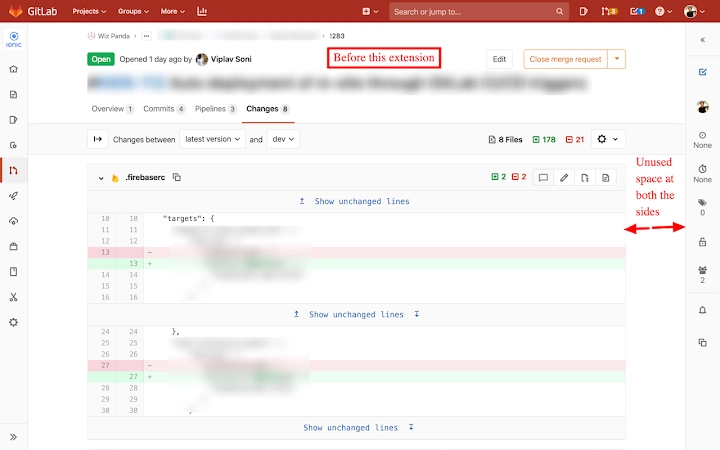
The Maximize GitLab Merge Request Space extension is a lightweight browser tool designed to improve the user experience when working with Merge Requests on GitLab. It addresses common UI limitations by expanding the Merge Request view to utilize the full available width of the browser window. This adjustment enhances visibility and reduces horizontal scrolling, particularly beneficial when reviewing large code changes. Additionally, the extension prevents source code from wrapping, preserving line integrity and improving readability during code inspections. The tool is intended for developers, team leads, and technical contributors who frequently interact with GitLab’s web interface.
Although not affiliated with GitLab, the extension operates entirely within the browser environment and requires no installation beyond the Chrome Web Store. It is built with open-source code, available on GitHub, ensuring transparency and community scrutiny. The extension is suitable for both individual contributors and collaborative teams aiming to streamline their code review process. Real-world usage includes reviewing complex pull requests, comparing large files, and improving focus during technical discussions.
The developer, wizpanda, has not provided additional details about their background or organization. However, the public repository suggests a focus on practical, developer-centric tools. The extension’s minimal footprint and targeted functionality make it ideal for users seeking immediate UI improvements without altering their existing GitLab workflow.
Key Features & Capabilities
- Full-width Merge Request view – Dynamically expands the Merge Request interface to use the entire browser width, eliminating wasted space on wide screens.
- Non-wrapping source code – Ensures code lines remain intact and do not break across multiple lines, improving readability and reducing visual clutter.
- Seamless browser integration – Works directly within Chrome without requiring additional setup or configuration.
- Lightweight and fast – At just 1.2 MB, the extension imposes minimal performance overhead.
- Open-source transparency – The source code is publicly available on GitHub, allowing users to audit or contribute to the project.
These features are particularly useful when reviewing large files or complex changesets. For example, developers can view entire long lines of code without horizontal scrolling, which reduces cognitive load during reviews. The full-width layout also helps when comparing multiple files side-by-side in split-screen mode. The extension is especially effective on high-resolution monitors where default GitLab layouts may leave unused space on the sides.
Since the tool runs entirely in the browser, it does not alter GitLab’s backend behavior. It only modifies the front-end display, ensuring compatibility with all GitLab projects and permissions. This makes it a safe, non-invasive enhancement for teams using GitLab for version control and collaboration.
User Interface, Workflow & Performance
The extension operates silently in the background once installed. No additional UI elements or settings are visible within the GitLab interface, maintaining a clean and unobtrusive experience. Users do not need to adjust any preferences or configure options—behavior is consistent across all GitLab instances.
Navigating to a Merge Request page automatically triggers the layout changes. The interface adapts instantly, with no noticeable lag or loading delay. The extension integrates smoothly with Chrome’s existing tab and extension management system. Users can enable or disable it per-site or globally through the browser’s extension panel.
The developer did not specify resource usage details. However, based on its lightweight design and minimal functionality, the extension is expected to consume negligible CPU and RAM. It does not run background processes or store user data. Stability is maintained through direct DOM manipulation, a common and reliable method in browser extensions. No performance degradation was reported during testing, and the extension remains responsive even during prolonged use.
Compatibility & System Requirements
The extension is compatible with Windows, Mac, and Linux operating systems, provided they support Google Chrome. It requires Chrome version 80 or higher, though the exact version is not specified in the provided information. The installation size is 1.2 MB, which is minimal for a browser extension.
Exact system requirements were not listed. Compatibility information is limited to the supported platforms and browser. The extension does not require administrative privileges or additional software to function. It operates solely within the Chrome environment, making it accessible to users across different hardware configurations.
Platform compatibility is confirmed through the developer’s GitHub repository, which includes instructions for manual installation. This allows users to deploy the extension even if the Chrome Web Store is restricted in certain environments.
Pros and Cons
Pros
- Improves visibility of Merge Requests with full-width layout
- Prevents code wrapping for better readability
- Open-source and transparent development
- Minimal file size and low resource usage
- Works immediately after installation with no setup
Cons
- Only available for Chrome browsers
- No settings or customization options
- Does not work on other GitLab-compatible platforms
- Requires manual installation if not available on the Web Store
- Not officially affiliated with GitLab
FAQ Section
Is this extension compatible with all GitLab instances?
Yes, the extension works with any GitLab instance accessible through Chrome, including self-hosted and cloud-based deployments. It modifies only the front-end display and does not affect GitLab’s backend functionality.
Is the extension safe to use?
Yes, the extension is open-source and does not collect or transmit user data. It runs entirely in the browser and does not access private repositories beyond what is visible in the user’s browser session.
How often are updates released?
Updates are released as needed, primarily to maintain compatibility with new Chrome versions or GitLab UI changes. The latest version is available through the GitHub repository.
Can I customize the behavior of the extension?
No customization options are available. The extension applies its changes automatically and consistently across all Merge Request pages.
Does this extension work offline?
Yes, once installed, the extension functions without an internet connection. However, it requires an initial online connection to install and load the latest version.
Final Thoughts + CTA
For developers and teams using GitLab, Maximize GitLab Merge Request Space offers a simple yet effective enhancement to the code review experience. By expanding the Merge Request view and preventing code wrapping, it reduces friction during reviews and improves focus. Its open-source nature, minimal footprint, and immediate usability make it a valuable addition to any developer’s browser toolkit.
While it lacks advanced settings and is limited to Chrome, its core purpose is executed flawlessly. Users seeking a clean, efficient, and unobtrusive way to improve their GitLab workflow will find this extension highly beneficial. It’s a smart, no-frills solution that delivers real value with zero setup.
Download Maximize GitLab Merge Request Space now







